
Moving
How to keep a moving box inventory
The week after a move, most of the stress is not knowing which box has the kettle, the chargers or the kids' bedding. A box inventory fixes that. Here is a system that takes a few seconds per box.
1. Number every box
Give each box a short number before anything goes in: 1, 2, 3, or a letter for the room plus a number, like K4 for the fourth kitchen box. Write it large on two sides and the top, so you can read it in a stack. Numbers beat descriptions because "Kitchen misc" ends up on six boxes.
2. Write down what goes in, as you pack
List the contents while the box is open, not after it's taped. You don't need every fork. Write what you would search for later: "passports, chargers, bike pump". If something matters, give it its own line.
- Room it goes to in the new place, which may differ from the room it came from.
- Fragile or heavy, so helpers know how to carry it.
- Open first for the box with bedding, toiletries, tools and chargers. Keep it in the car if you can.
3. Keep the list where you can search it
A paper list taped to the box helps the movers. It doesn't help when you're standing in the new kitchen asking which of 40 boxes has the can opener. Keep a copy on your phone: a note, a spreadsheet or an app, as long as you can search it.
4. Photograph what's inside
A photo of the open box before you tape it takes two seconds and answers questions a written list can't, like which blue mug or which cable. Photos also help with an insurance or moving claim if something arrives damaged.
5. Unpack by number, not by guess
Put each box in its room as it comes off the truck. When you need something, search the list, find the number, open that box. Cross boxes off as you unpack, and keep the ones you won't open for months (seasonal, keepsakes) listed. They become your storage inventory.
Quick checklist
- Number on two sides and the top
- Room it's going to
- Contents you'd search for
- Photo before taping
- Fragile, heavy or open-first marked
Want ready-made labels? Print free moving box labels with a number, room and contents line.
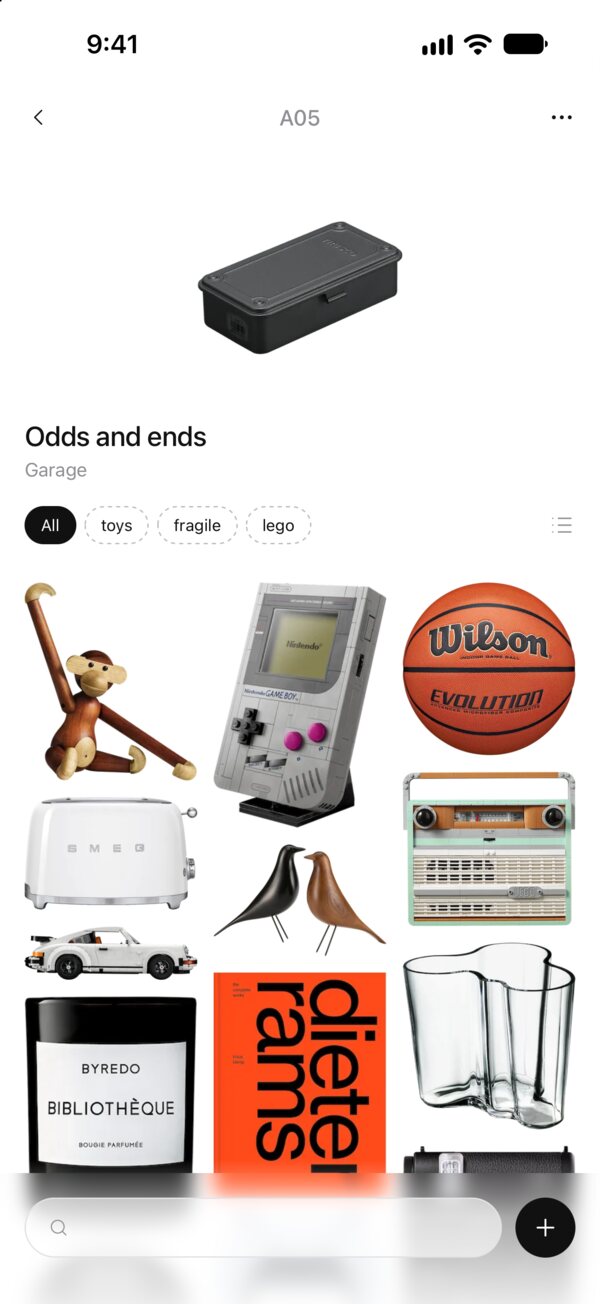
BoxRay does the list for you
Photograph a box, then each thing that goes in it. BoxRay cuts every item out of its photo, so you can search "kettle" and see which box it's in.
Download on the App StoreFree for your first five boxes. iPhone and iPad.